











 Productivity

Running a small business has always been a high-risk balancing act. You’re the CEO, marketing manager, and customer service manager all rolled into one. But the focus is shifting from more work to smarter work. AI tools are becoming the affordable, 24/7 team member that small businesses have been waiting for.
According to the Nextiva CX Trends Report 2025, 92% of businesses have integrated AI into their customer service processes to some extent. Of those, around 40% are using generative AI (GenAI) for tasks like writing customer responses. Why this rapid increase, and why should you benefit?
Because AI levels the playing field. It allows small and medium-sized enterprises (SMEs) to access the same fast customer service, instant data analysis, and creative opportunities as large corporations — at a significantly lower cost.
In this article, we’ll introduce you to the 12 best AI tools for small businesses that’ll support your workflows in 2026 and help you achieve more with less effort.
Summary of the Top AI Tools for Small Businesses
| Tool | Best for | Key benefit |
| Nextiva | Customer Service | 24/7 AI virtual receptionist & unified communications |
| ChatGPT | Business Planning | Brainstorming strategies & drafting plans |
| Canva | Design | Creating marketing assets |
| Zapier | Automation | Connecting apps to automate repetitive tasks |
| QuickBooks | Accounting | Auto-categorizing expenses & forecasting cash flow |
| Jasper | Marketing | Generating on-brand content for campaigns |
| Otter.ai | Meetings | Auto-transcribing & summarizing meetings |
| Notion AI | Organization | Turning messy notes into structured docs |
| Flick | Social Media | Auto-generating captions & hashtag strategy |
| Grammarly | Editing | Real-time tone & grammar correction |
| Claude | Analysis | Summarizing long documents & contracts |
| Reply.io | Sales | Automating personalized cold email outreach |
12 Best AI Tools for Small Businesses (Detailed)
1) Nextiva: Best for Intelligent Customer Service & Communication
Nextiva is a unified customer experience platform that combines voice, video, SMS, and chat communication. For small businesses, it solves the core problem of disorganized customer communication by consolidating all interactions into a unified dashboard. Instead of switching between phone systems, email inboxes, and separate chat apps, your team gets a central platform to manage everything.
The real game-changer comes from XBert AI, Nextiva’s intelligent AI receptionist. Unlike the frustrating menus of the past, XBert is a conversational AI agent that greets customers naturally, answers frequently asked questions from your knowledge base, and efficiently handles complex workflows like scheduling appointments or sending confirmation SMS messages. XBert helps your team keep tabs on important leads while automating mundane tasks and offering intelligent customer service during busy periods or after-hours.
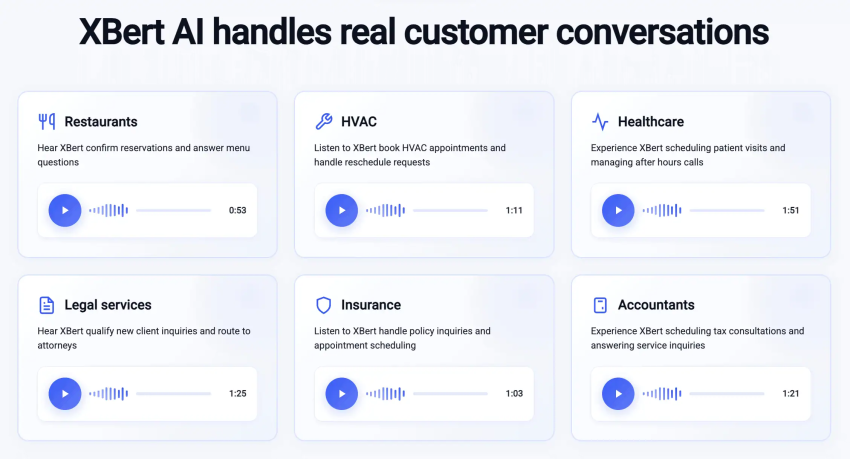
Nextiva’s key AI features:
- AI receptionist: XBert can handle hundreds of calls simultaneously, guaranteeing seamless accessibility. Calls are routed based on complex rules (e.g., “VIP customer calling”), and SMS reminders are automatically sent for missed calls.
- Real-time sentiment analysis: Nextiva’s built-in AI features analyze live calls and immediately report dissatisfied customers to the appropriate managers. This allows you to salvage at-risk customer relationships before customers churn.
- Intelligent call summaries: Every conversation is automatically transcribed and summarized. The notes are transferred directly to your CRM system, giving your sales team the necessary context at their fingertips.
- Real-time coaching: AI suggests responses or upsells during calls. The real-time coaching and AI agent assist features help your team handle objections and other critical aspects of the conversation consistently. This makes your customer experience uniform across channels.
- Intelligent IVR routing: Skill-based routing ensures that each customer is directed to the right agent. This routing is based on agents’ availability, expertise, time of day, geolocation, and various other unique factors.
Pricing:
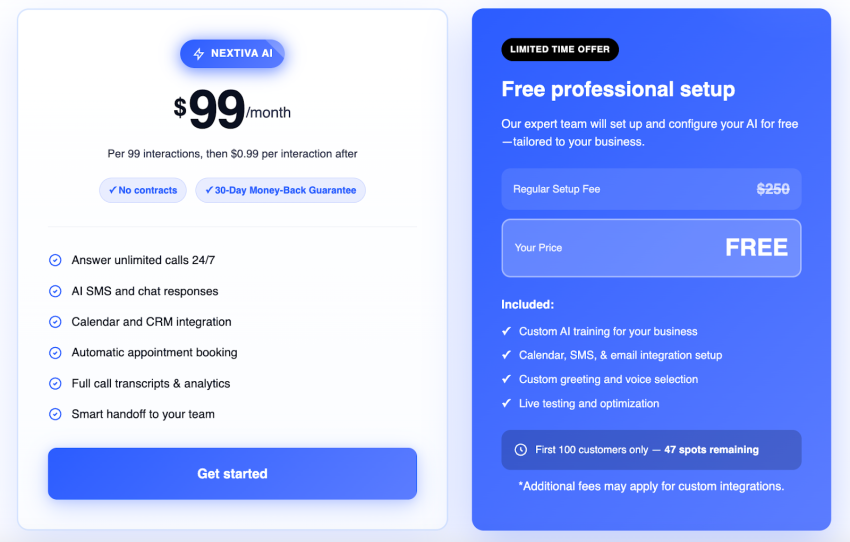
Nextiva offers tiered plans based on team size and functionality, plus a dedicated add-on for the AI receptionist:
- Core: $15/user/mo. Includes inbound/outbound calling, business SMS, video meetings, and basic call routing.
- Engage: $25/user/mo. Adds customer-to-team SMS, toll-free number, voice analytics, and web chat.
- Power Suite CX: $75/user/mo. The full omnichannel suite with advanced AI automation.
- XBert AI Receptionist: $99/month (includes 100 conversations). Additional conversations are charged at $0.99 each.
2) ChatGPT: Best for Business Ideas & Planning
ChatGPT (powered by the flagship GPT-4o model) acts as a highly skilled consultant for your business. Many use it for writing emails, but it’s especially helpful for small business owners with strategic planning needs. You can use it as a sparring partner to simulate sales negotiations, review your business plan, or develop competitive advantages.
For teams, the ChatGPT Team plan adds a critical layer of security: it excludes your data from training, meaning your proprietary business strategies remain private. It also allows you to create custom GPTs — specialized versions of the generative AI chatbot trained on your specific company documents (e.g., an “HR Bot” that answers employee questions based on your handbook).
ChatGPT’s key AI features:
- Data analysis: Upload an Excel file containing your monthly sales figures. ChatGPT will then instantly generate charts, identify trends, and forecast next month’s revenue.
- Custom GPTs: Create a mini-app for your team without any coding. For example, a “customer support assistant” that drafts responses based solely on your uploaded support manuals.
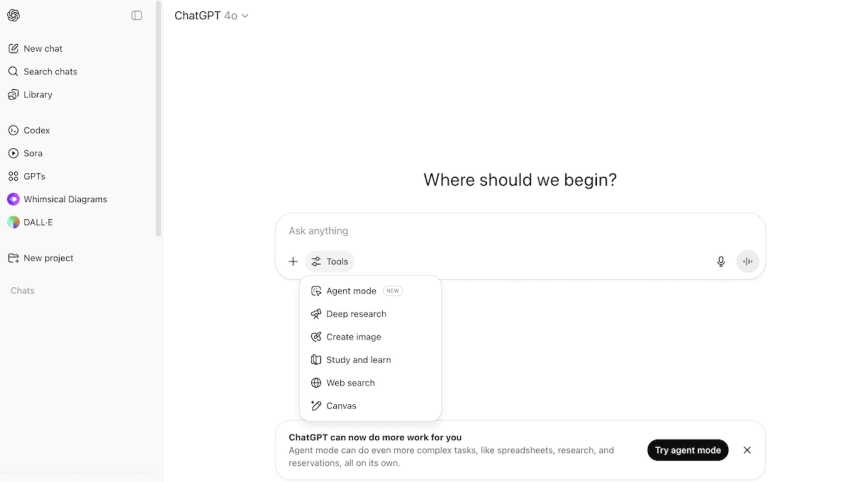
- Canvas interface: A new collaboration window where you and the AI can edit documents or write code together. This makes it easier to optimize longer texts.
Pricing: Free basic version. Plus plan is $20/mo. Team plan is $25/user/mo.
3) Canva AI Generator: Best for design creation
Canva has democratized design, but the AI suite Magic Studio goes a step further, eliminating the blank page problem. You no longer need to be a designer to create professional content; you simply need to be able to describe what you want.
The standout feature for busy users is Magic Switch. With just one click, it transforms a horizontal presentation slide into a vertical Instagram story, a LinkedIn post, or a blog banner, automatically adjusting the layout and text. This allows a single person to run a multi-channel marketing campaign that would normally require an entire creative team.

Canva’s key AI features:
- Magic Media: Enter a text template like “A modern café with neon lights,” and unique, royalty-free images or short videos will be generated for your ads.
- Brand voice integration: The “Magic Write” text assistant can be trained to your brand’s specific tone, ensuring your text sounds as good as it looks.
- Magic Expand: Upload a photo that’s too small or cropped too much, and the AI will paint the rest of the scene to fill the image naturally.
Pricing: Robust free plan. Pro starts at $120/year.
4) Zapier: Best for Workflow Automation
Zapier is the interface between your business apps, enabling them to communicate with each other without requiring developers. Thanks to new AI features, getting started is significantly easier: simply describe your workflows in plain English (e.g., “When I receive a new lead on Facebook, add them to Nextiva and send a welcome email”), and Zapier creates the automation for you.
In addition to these simple connections, Zapier now offers Central, an AI bot that works across apps. You can program it to monitor spreadsheets and execute actions as soon as certain criteria are met. This essentially gives you an automated operations manager.
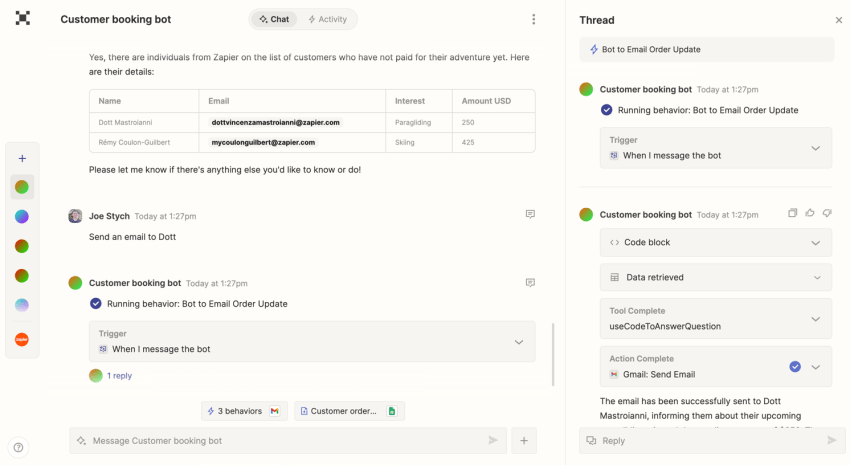
Zapier’s key AI features:
- AI zaps: Create complex workflows in a snap using natural language — no manual understanding of triggers and actions required.
- Interfaces & tables: Develop simple internal applications (e.g., a lead approval portal) that integrate your automated data and provide your team with a clear user interface for managing automated tasks.
- 6,000+ integrations: Connect to virtually every tool small businesses use, from QuickBooks and Slack to Google Sheets.
Pricing: Free plan available. Professional plan with AI features begins at $19.99/mo.
5) QuickBooks Online: Best for Accounting
QuickBooks has integrated Intuit Assist, an AI-powered financial assistant that’s built right into your dashboard. For small business owners who need bookkeeping capabilities, this is a huge relief. Instead of tediously sifting through reports, you can simply ask questions in plain language, such as, “Which customers have outstanding invoices?” or “How is my profit this month compared to last year?”
Intuit Assist proactively helps you manage cash flow, which is the biggest risk factor for small businesses. Intuit Assist can analyze your expenses and income, identify potential cash flow problems weeks in advance, and warn you in time.
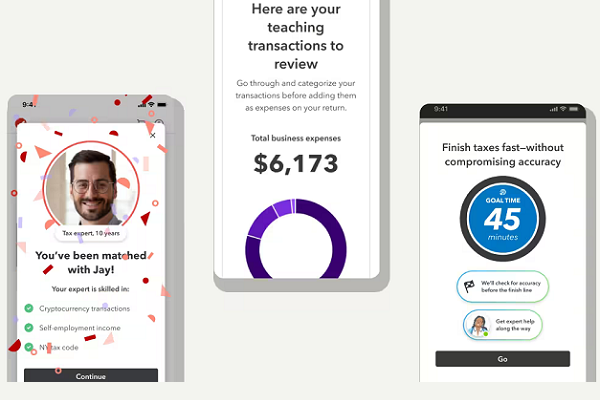
QuickBooks’ key AI features:
- Smart categorization: The AI learns from your history to automatically categorize expenses and match bank transactions to invoices, saving hours of manual reconciliation.
- Invoice automation: It can draft reminder emails for overdue payments and personalize them to sound less robotic.
- Cash flow forecasting: Predictive AI models visualize your future bank balance based on recurring bills and expected payments.
Pricing: Simple Start plan begins at $19/month.
6) Jasper: Best for Marketing Content
While general AI tools can write copy, Jasper is designed for performance marketing. Its key strength is Jasper IQ, which allows you to upload your style guide, past blog posts, and product descriptions. Jasper learns your brand voice so precisely that it creates content indistinguishable from that written by your best copywriters.
It shines when it comes to campaign remixing. Simply enter a product description, and Jasper instantly generates a comprehensive list of campaign materials: a press release, three blog posts, ten social media posts, and a landing page — all aligned with the same messaging strategy.
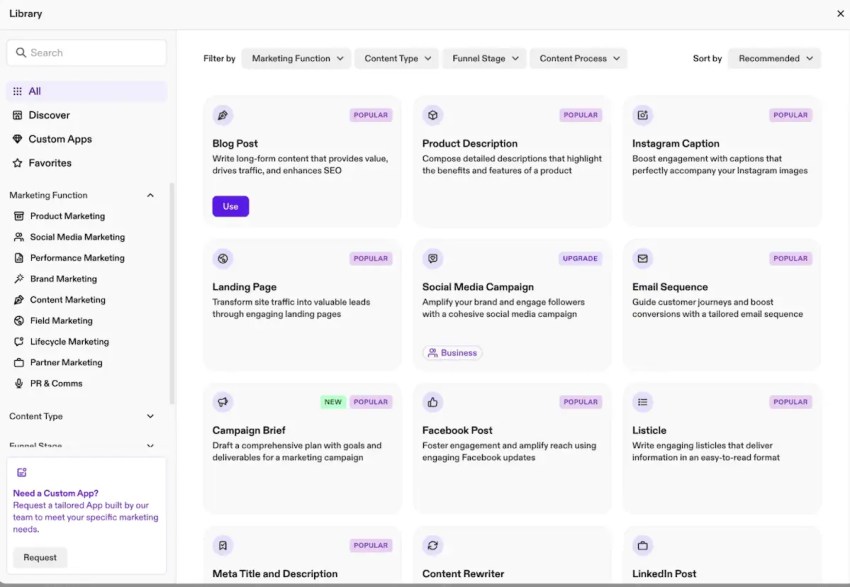
Jasper’s key AI features:
- Brand voice & knowledge base: Securely stores your company’s strategy and facts, ensuring the AI generates accurate information about your products.
- SEO mode: Integrates with Surfer SEO to evaluate your content in real time, optimizing your blog posts for high Google rankings.
- Marketing agents: Autonomous AI bots capable of handling tasks from start to finish, such as “Research this topic and create a blog draft.”
Pricing: Plans start from $59/mo.
7) Otter.ai: Best for Meeting Productivity
Otter.ai is more than just a transcription tool; it’s an automated meeting assistant. The OtterPilot feature automatically joins your Zoom, Google Meet, or Teams meetings to record, transcribe, and summarize the discussion in real time.
For small teams, the chat feature is invaluable. After a long strategy meeting, you don’t have to reread the entire minutes. Simply ask Otter, “What deadlines did we agree on?” or “Did we discuss the budget?”, and Otter will extract the exact answer from the conversation, including timestamps.
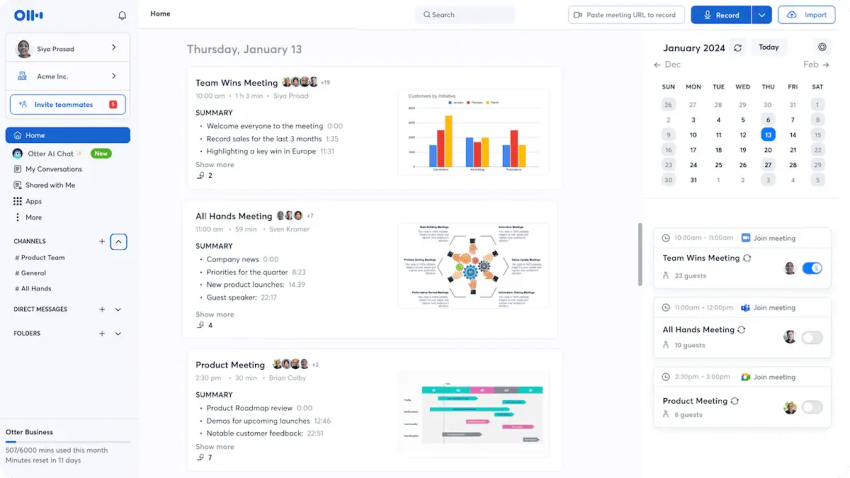
Otter’s key AI features:
- Live summary: Creates a running summary of the meeting, allowing latecomers to catch up immediately without interrupting the flow.
- Task recognition: Automatically detects tasks like “John will email the customer” and creates a task list.
- Sales insights: (In higher-tier plans) Extracts specific insights like budget or authority from sales conversations to help you qualify leads.
Pricing: Free basic plan. Pro is $8.33/user/mo.
8) Notion AI: Best for Knowledge Management
Notion has evolved from a note-taking app into a connected workspace. Notion AI acts as a search engine for all your company’s knowledge. Because it’s connected to your documents, Slack, and Google Drive, you can ask cross-platform questions, such as “What’s the current status of the Project X launch?” Notion will find the answers across your various files.
It’s also a powerful drafting tool. You can easily capture your unstructured brainstorming points on a single page and ask Notion AI to create a structured project specification. Notion AI brings order to the chaos and produces a clear, professional document.
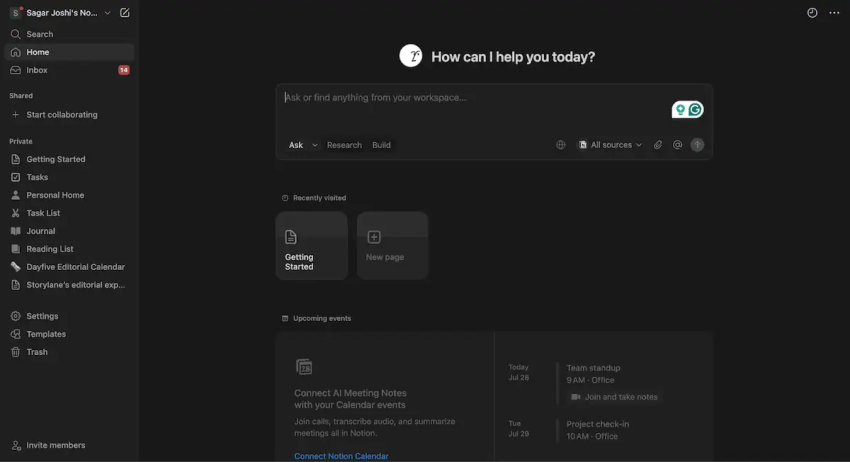
Notion’s key AI features:
- Q&As: Ask questions about your specific documents (“Who is the contact person for the alpha customer?”).
- Database automation: AI can automatically populate columns in your project trackers, such as creating a summary or extracting next steps from linked meeting notes.
- Wiki cleanup: It proactively suggests outdated or in-need-of-revision pages, keeping your knowledge base up to date.
Pricing: Notion AI comes bundled with paid subscriptions or as an add-on option: The Plus plan ($10/user/month) includes basic AI features, while the Business plan ($18/user/month) adds advanced AI features such as meeting notes.
9) Flick: Best for Social Media Automation
Flick is a specialized tool that takes the complex work out of your social media strategy. Flick’s AI social media manager, Iris, helps you go from initial idea to finished post in minutes. Iris is specifically trained on social media trends and best practices.
The integrated Content Lab lets you brainstorm. Simply enter a topic, and Iris generates dozens of content ideas, which are then transformed into ready-made captions with relevant hashtag suggestions. This allows small businesses to post regularly without needing a full-time social media manager.
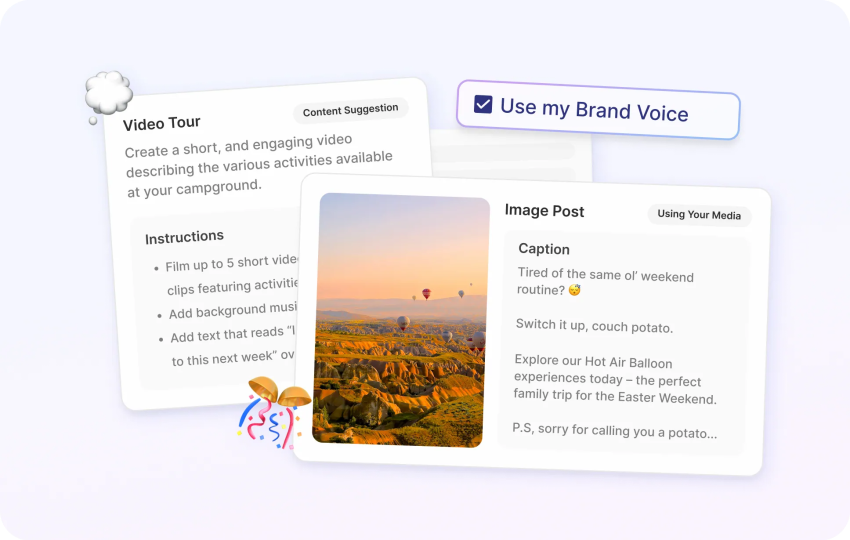
Flick’s key AI features:
- Hashtag analysis: The industry’s best hashtag tool helps you find low-competition hashtags that actually make your posts visible, instead of letting them get lost in the sea of popular hashtags.
- Post scheduling: A visual drag-and-drop calendar that automatically publishes posts to Instagram, Facebook, TikTok, and LinkedIn.
- Reuse: With just one click, you can transform a long blog post or video script into a series of short, concise social media captions.
Pricing: Iris is included on all Flick plans starting at around $13.98/month.
10) Grammarly: Best for Editing & Professionalism
Grammarly has evolved far beyond a simple spell checker. For small business users, it’s a real-time communication coach. The tone detector ensures your emails strike the right balance — alerting you when you sound too aggressive, too passive, or just right. This is crucial for small teams where a single inappropriate email to a client can cost them a deal.
The new authorship feature tracks which parts of a document were generated by humans and which by AI. This keeps your communication transparent and human, something increasingly valued by clients.
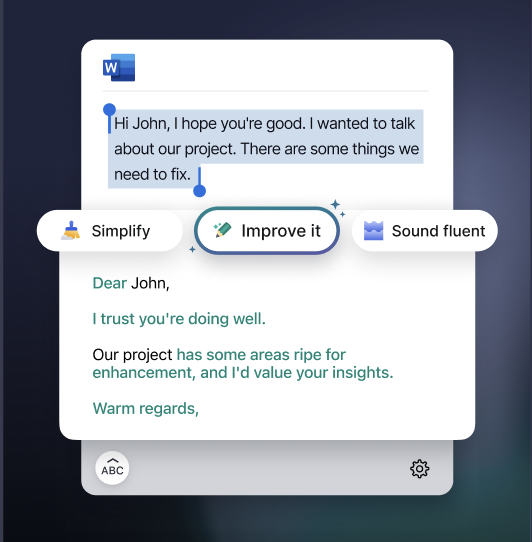
Grammarly’s key AI features:
- Strategic suggestions: Besides grammar checking, it suggests restructuring entire paragraphs for greater clarity and impact.
- App integration: Works wherever you work — Gmail, Slack, Word, LinkedIn — keeping a consistent professional image across all channels.
- Company style guides: (Business plan) Define the company-specific terminology (e.g., “always capitalize Gold Member”) — for your entire team.
Pricing: Free basic plan. Pro is $12/member/mo.
11) Claude: Best for Complex Analysis
Claude (by Anthropic) is preferred over ChatGPT for complex analytical tasks. Thanks to its massive context window (200,000 tokens), you can upload entire books, extensive contracts, or large financial datasets and ask detailed questions about them.
The standout feature is Artifacts. When you ask Claude to write code, design a website, or create a flowchart, a separate window opens where you can view, edit, and interact with the result in real time. This makes Claude feel less like a chatbot and more like a collaborative workspace.
Claude’s key AI features:
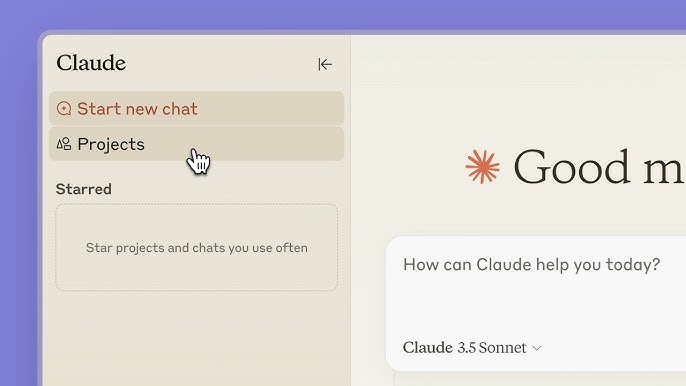
- Projects: You can upload a knowledge library (e.g., your brand guidelines or your codebase) to a project. Claude will then access this context in every new chat within that folder.
- Nuanced writing style: Claude features a more natural, less robotic writing style than other models, making it ideal for crafting sensitive customer communications.
- Programming functions: The Claude 3.5 Sonnet model is a first-class programming assistant capable of creating simple internal tools or debugging your website.
Pricing: Free basic plan. Pro is $20/mo (billed monthly).
12) Reply.io: Best for Sales Outreach
For small B2B companies, Reply.io is a real powerhouse for acquiring new customers. The AI Jason works as a digital sales representative (SDR), automating the entire outbound process: from finding potential customers and writing personalized emails to processing those emails.
Reply.io doesn’t just send emails; it also creates multichannel sequences. You can set up a workflow that automatically sends an email on the first day, a LinkedIn connection request on the third, and a follow-up SMS on the fifth. This keeps you top of mind with potential customers.
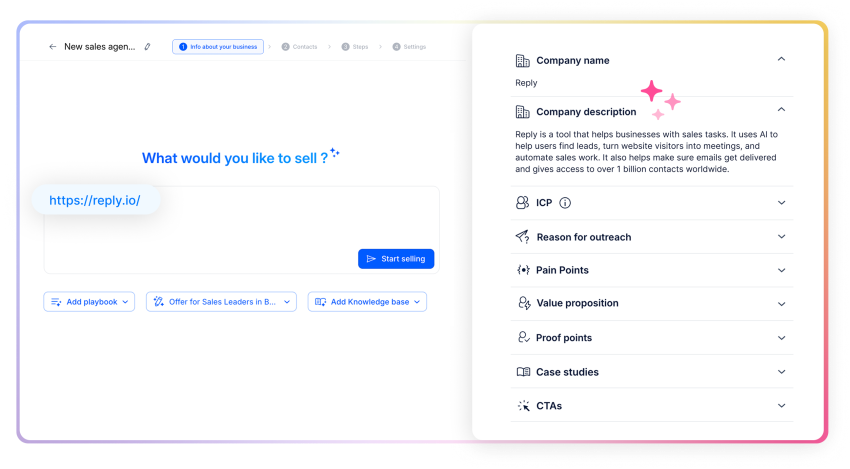
Reply.io’s key AI features:
- Jason AI Assistant: Answers basic questions from potential customers (e.g., “Request pricing information”) and schedules appointments directly in your calendar.
- Deliverability check: Integrated checks make sure your emails actually land in the inbox and aren’t marked as spam — a common pitfall when cold calling on your own.
- Meeting Booker: An integrated scheduling tool that eliminates the need for those tedious email exchanges.
Pricing: Starting at $49/user/month.
Key Takeaway: Why Nextiva’s XBert AI is the Ultimate Small Business Upgrade
If you’re only implementing one AI tool this year, choose Nextiva with XBert AI. It solves the biggest problem for small businesses: missed opportunities due to staff shortages. XBert AI isn’t just a chatbot; it’s an integrated, personalized answering service that manages customer interactions across calls, texts, and chats with a professional, human-like voice.
How it transforms your small business operations:
- Available 24/7: XBert answers every call instantly, even at 2 a.m. or during peak hours. Reach every potential customer while you sleep.
- Intelligent scheduling: Complex requests like booking and rescheduling appointments are handled in real time and synced directly with your calendar — no more tedious back-and-forth on the phone.
- Professional demeanor: The AI recognizes emotional nuances (like enthusiasm or composure) and uses a high-quality voice. This makes callers feel like they’re speaking to a professional, not a robot.
- Integrated efficiency: Phone calls, text messages, and web chats are all integrated into a single user interface. For complex conversations, XBert intelligently forwards the transcript to the appropriate agent.
How To Use AI to Run a Small Business
Implementing AI isn’t about buying software, but about optimizing your workflows. Follow these best practices for a successful AI implementation:
Audit the busy work
Before you invest in an AI tool, track your work time for a week. Identify the following types of tasks:
- Recurring tasks: (e.g., “I type the same email reply ten times a day.”)
- Data-intensive tasks: (e.g., “I spend three hours entering invoices.”)
- Time-sensitive tasks: (e.g., “I missed a customer call because I was in a meeting.”)
These are your goals for AI automation.
Start with the low-hanging fruit
Don’t automate everything at once. Choose one key area for a pilot project:
- For missed calls: Activate Nextiva’s XBert AI to handle after-hours inquiries.
- For marketing: Use Jasper or ChatGPT to create a whole month’s worth of social media posts in just 30 minutes.
- For meetings: Record your next client meeting with Otter.ai so you can focus on eye contact instead of taking notes.
Always keep a human in the loop (ethical AI)
The goal of AI tools is to support, not replace. Ethical AI use means using technology to automate tasks, allowing your employees to refocus on their core responsibilities.
- Don’t hide the AI: Be transparent with customers when they interact with a bot (like XBert).
- Don’t replace employees: Instead of laying off administrative staff because AI is now handling scheduling, provide them with further training so they can focus on customer relationship management or sales, tasks that require empathy and strategic thinking.
- Grow simultaneously: Use AI to manage volume (quantitative) while your team ensures value creation (qualitative).
Train and refine
AI is not a set-and-forget solution. Regularly review chat logs and AI-generated content to stay aligned with your brand message. Show your employees that AI is a tool that makes their work easier, not a threat to their jobs.
For example, explain to your sales team how Reply.io generates leads so they can spend their time closing deals instead of searching through emails.
Scale your usage
Once you’ve automated the basics, use AI for strategic insights.
For example:
Ask ChatGPT or Claude: “I own a small business in the [industry]. Act as a business consultant and analyze my growth strategy for 2026.”
Use QuickBooks Intuit Assist to forecast your cash flow and ask: “How will hiring a new employee next month impact my cash flow?”
Nextiva’s AI Tools Help You Crush Your Small Business Operations
AI solutions for entrepreneurs and enterprises help automate repetitive tasks that can consume your focus. Since these tasks are essential, AI ensures they are executed in a way that doesn’t hamper your focus but rather brings you peace of mind. AI takes care of them while you concentrate on critical daily operations that demand your attention.
This way, your productivity increases, and you get to create more output in the same amount of time. It enables you to streamline your operations while still achieving your business goals — or possibly even overachieving.
Communication is a fundamental element in a business, and among these tools, Nextiva’s AI and service channels stand out. Nextiva enables you to deliver the kind of experience that customers expect from big corporations — at a lower cost. The ROI shoots up, along with your customers’ satisfaction.
AI Tools for Small Businesses FAQs
Generative AI refers to algorithms (such as ChatGPT or Claude) that can generate new content, including text, images, code, and videos, based on user input. For small businesses, using generative AI for content creation is a competitive advantage. It allows a single marketing manager to operate like a full-fledged creative agency, producing blog posts, social media graphics, and email campaigns in minutes instead of days, as long as they stay transparent about the usage.
The best free options start with ChatGPT (free tier) for drafting emails and marketing copy, and Canva for creating professional social media graphics without a designer. Zapier’s free plan is excellent for automating simple tasks, like saving email attachments to Google Drive. Otter.ai offers a generous free tier for meeting transcription. These freemium tools allow you to test capabilities and scale your operations without any upfront financial commitment.
AI can provide instant, 24/7 availability. Tools like Nextiva offer virtual receptionists who take calls, forward inquiries to the appropriate department, and schedule appointments while you sleep. AI chatbots can instantly answer frequently asked questions (FAQs), freeing up your staff to focus on more complex customer issues with greater empathy and concentration.
Affordability depends on a high ROI. For under $20/month, productivity tools like Grammarly and unified communications platforms like Nextiva offer excellent entry points. ChatGPT Plus is also cost-effective and serves as a versatile marketing and strategy assistant. When choosing tools, prioritize those that will save you more working hours than they cost in subscription fees, essentially paying for themselves.
For drafting and brainstorming, ChatGPT and Claude are great; they can structure your management summary, conduct market research, and critically review your strategy. For complex financial modeling and forecasting, specialized tools like LivePlan are recommended to ensure accuracy. Notion AI offers an excellent, flexible alternative that allows you to transform unstructured research findings and ideas into a structured, shareable strategy paper.